

expanding-collection
https://github.com/Ramotion/expanding-collection
A card peek/pop controller.
关于本项目
Ramotion, Inc 出品.
专注于移动应用程序和网站的自定义 UI 的设计和编码
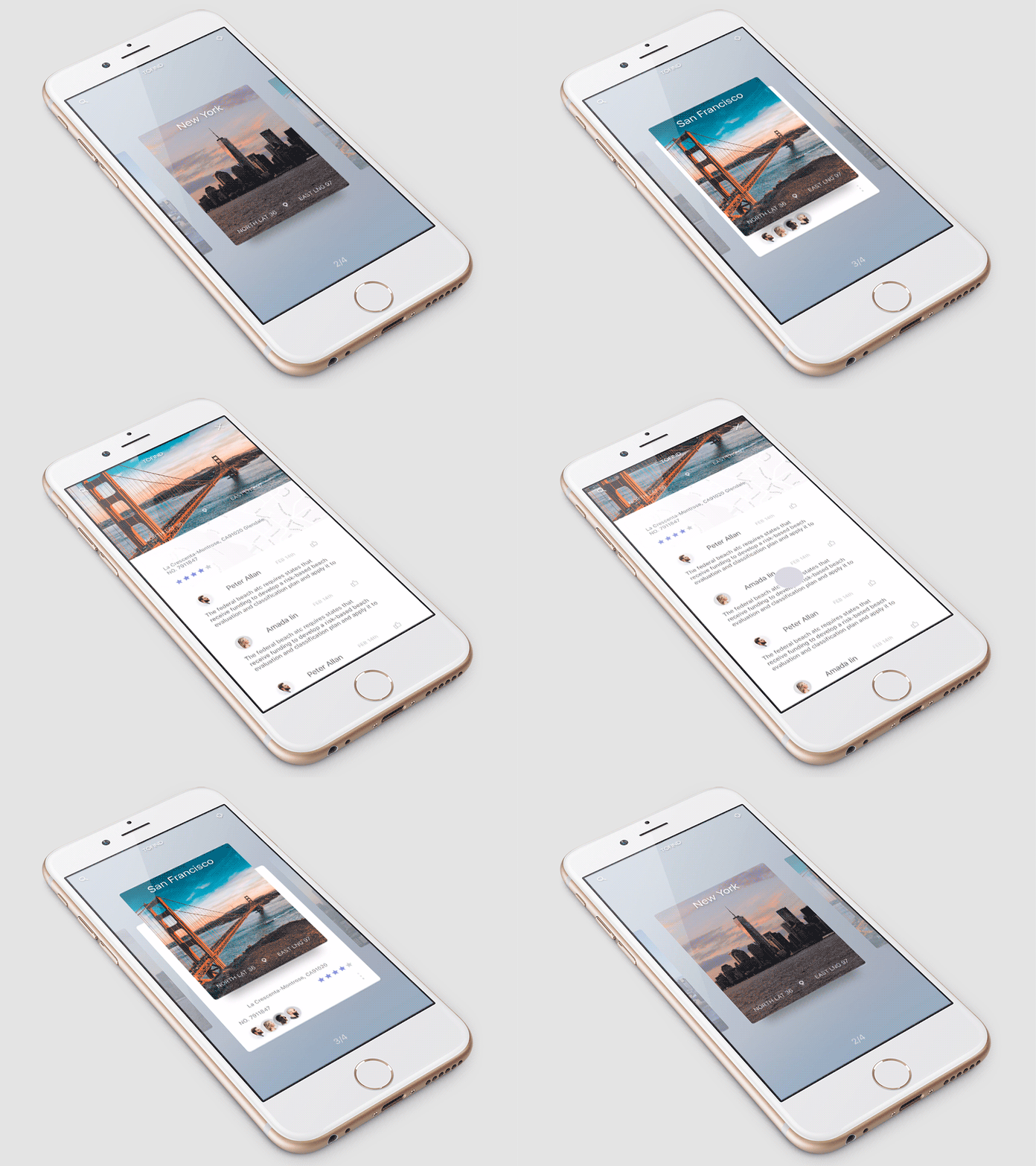
The iPhone mockup available here.
环境需求
- iOS 9.0+
- Xcode 8
安装方式
只需将 Source 文件夹添加到您的项目.
或者使用 CocoaPods , Podfile 文件中添加以下一行:
pod 'expanding-collection', '~> 1.0.3' swift 3

pod 'expanding-collection', '~> 0.3.2' swift 2
or Carthage Cartfile 文件添加以下一行:
github "Ramotion/expanding-collection"
使用方法
import expanding_collection
Create CollectionViewCell
-
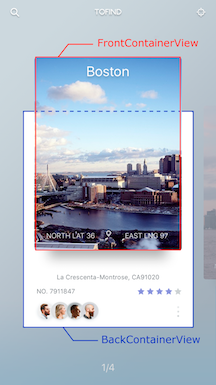
Create UICollectionViewCell inherit from
BasePageCollectionCell(recommend create cell with xib file) -
Adding FrontView
- add a view to YOURCELL.xib and connect it to
@IBOutlet weak var frontContainerView: UIView! - add width, height, centerX and centerY constraints (width and height constranints must equal cellSize)
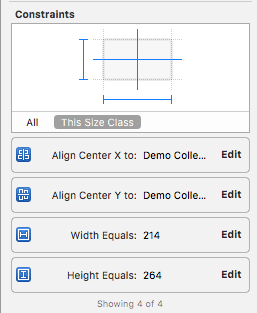
- connect centerY constraint to
@IBOutlet weak var frontConstraintY: NSLayoutConstraint! - add any desired uiviews to frontView
- Adding BackView
- repeat step 2 (connect outlets to
@IBOutlet weak var backContainerView: UIView!,@IBOutlet weak var backConstraintY: NSLayoutConstraint!)
- Cell example DemoCell
If set tag = 101 for any FrontView.subviews this view will be hidden during the transition animation
Create CollectionViewController
-
Create a UIViewController inheriting from
ExpandingViewController -
Register Cell and set Cell size:
override func viewDidLoad() {
    itemSize = CGSize(width: 214, height: 264)
    super.viewDidLoad()

    // register cell
    let nib = UINib(nibName: "NibName", bundle: nil)
    collectionView?.registerNib(nib, forCellWithReuseIdentifier: "CellIdentifier")
}
- Add UICollectionViewDataSource methods
extension YourViewController {

  override func collectionView(collectionView: UICollectionView, numberOfItemsInSection section: Int) -> Int {
    return items.count
  }

  override func collectionView(collectionView: UICollectionView, cellForItemAtIndexPath indexPath: NSIndexPath) -> UICollectionViewCell {
    let cell = collectionView.dequeueReusableCellWithReuseIdentifier("CellIdentifier"), forIndexPath: indexPath)
    // configure cell
    return cell
  }
}
- Open Cell animation
override func viewDidLoad() {
    itemSize = CGSize(width: 214, height: 264)
    super.viewDidLoad()

    // register cell
    let nib = UINib(nibName: "CellIdentifier", bundle: nil)
    collectionView?.registerNib(nib, forCellWithReuseIdentifier: String(DemoCollectionViewCell))
}
func collectionView(collectionView: UICollectionView, didSelectItemAtIndexPath indexPath: NSIndexPath) {
    cell.cellIsOpen(!cell.isOpened)
}
if you use this delegates method:
func collectionView(collectionView: UICollectionView, willDisplayCell cell: UICollectionViewCell, forItemAtIndexPath indexPath: NSIndexPath)

func scrollViewDidEndDecelerating(scrollView: UIScrollView)
must call super method:
func collectionView(collectionView: UICollectionView, willDisplayCell cell: UICollectionViewCell, forItemAtIndexPath indexPath: NSIndexPath) {
  super.collectionView(collectionView: collectionView, willDisplayCell cell: cell, forItemAtIndexPath indexPath: indexPath)
  // code
}

func scrollViewDidEndDecelerating(scrollView: UIScrollView) {
  super.scrollViewDidEndDecelerating(scrollView: scrollView)
  // code
}
Transition animation
-
Create a UITableViewController inheriting from
ExpandingTableViewController -
Set header height default 236
override func viewDidLoad() {
    super.viewDidLoad()
    headerHeight = ***
}
- Call the push method in YourViewController to YourTableViewController
  if cell.isOpened == true {
    let vc: YourTableViewController = // ... create view controller
    pushToViewController(vc)
  }
- For back transition use
popTransitionAnimation()
 Select Language